
For this lesson I was tasked with a couple different things. The first was to make a header for my site using the video game photo effect. That is how I created the title above this section. Next, I was tasked with creating ads and posters for a movie based on my dog. The first being a piece of cover art, the second, a printed ad, the third, a poster ad, and lastly, a social media ad.
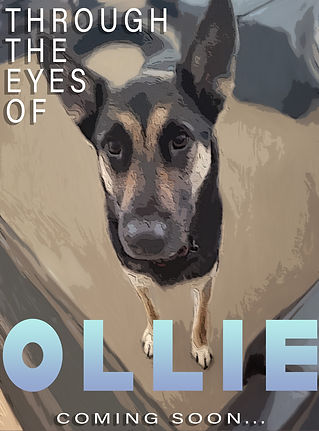
Movie Cover -
For the movie, I decided to choose to make it based off of my dog, Ollie. For this first picture, I used the photo effects tutorial that was provided to create the effect on Ollie. Then I used the mixer brush to add a more painterly effect to the rest of the image. Then I added the text and there you have it.
Print Ad -
For the print out ad I used the same effect, but made some adjustments to the amounts and filters. I used that on each of the pictures of Ollie. I also used masks to have just his body in each picture. I found that the bottom right picture was blending into the top one too much so I added an outer glow effect to help it stand out a bit more. Lastly, I formatted the text, and it was done!


Movie Poster -
For the poster, I thought it would be cool to have the image of Ollie big so that it would be the thing that caught the viewer's eye, along with the text. I used The same type of filter, but changed the settings around a bit till I got the image I liked. Then I added the text and the text effects such as a drop shadow, and I was done.
Social Media Ad -
Lastly was the social media ad. I chose another picture and added some effects to it. I bumped up the amount in the oil paint setting to give it a smoother more paint-like feeling. Next, I got a picture of the Instagram interface off of Google and added in my image. I then changed the profile information as well as the comments below the post.

